Follow my key accounts
See every account you target in one place, and choose which ones Sillage watches for signals.
Your key accounts are the companies on your Prospects and Customers lists, gathered on one screen with the right people found inside each. Turn on monitoring for the ones that matter: Sillage then watches them and tells you when to reach out.
Before you start
- Build at least one Prospects or Customers list.
- You need the Admin role to start or stop monitoring. Everyone in the team can see the accounts.
Open your key accounts
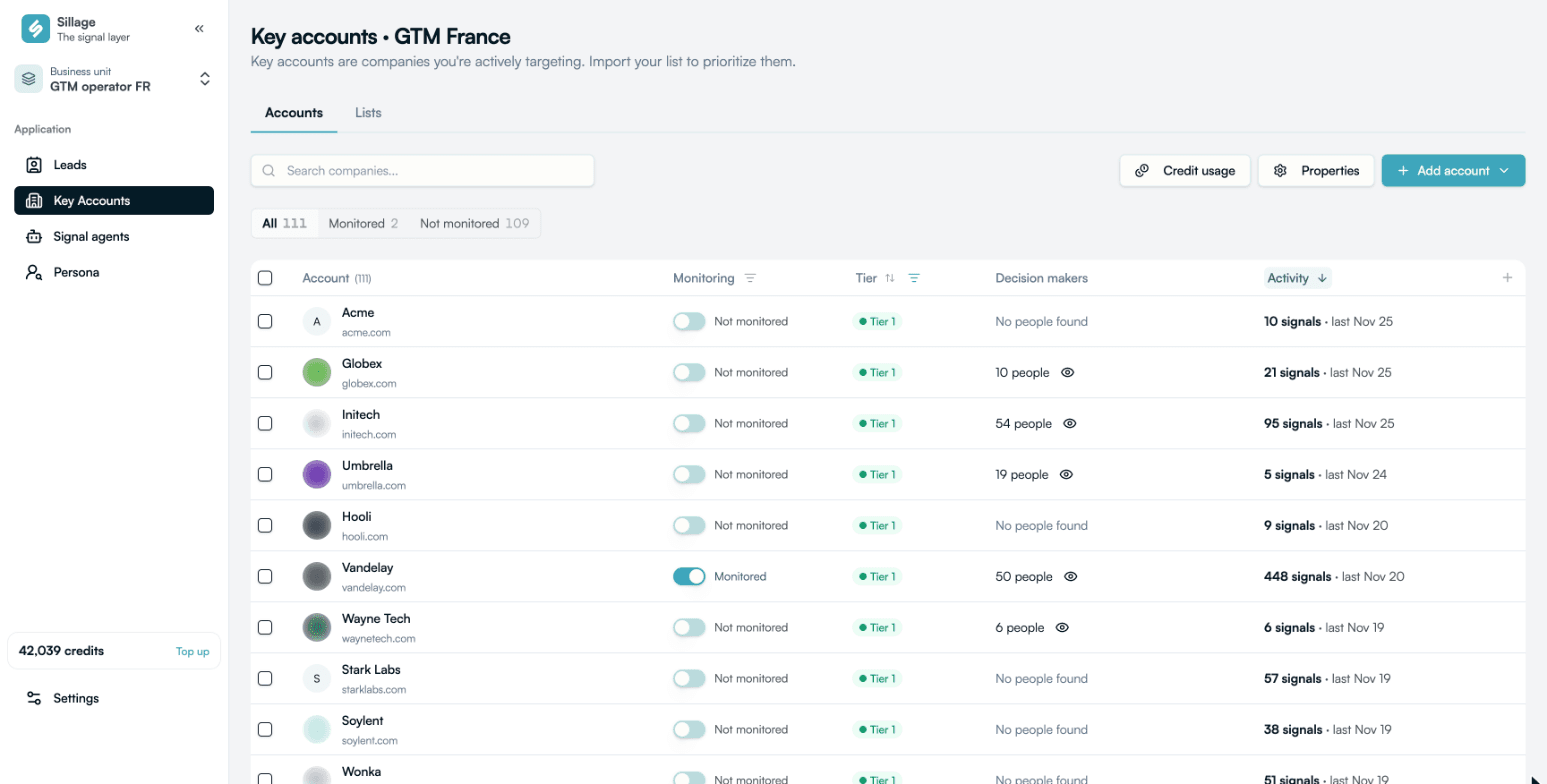
Click Key Accounts in the sidebar. Each account shows its Monitoring switch, Tier, Lists, Decision makers, Activity and Owner. Use Search companies... or the All, Monitored and Not monitored filters to narrow it down.
See who is inside an account
The Decision makers column shows how many people from your persona Sillage found in the account. Click an account to open its panel and see them.
- "Mapping people…": Sillage is still looking.
- "No people found": nobody in this account matches your persona yet.
- "Company not found": Sillage could not tell which company you meant. Give it its LinkedIn page.
Turn on monitoring
Hover an account's Monitoring switch to see what it costs, then turn it on. To monitor several at once, tick them and click Monitor in the bar that appears. A window shows how many credits it costs per month and your balance after. Click Monitor to confirm.
To monitor a whole list, including the accounts added to it later, open the Lists tab: each list shows its accounts, how many are monitored, its mode (Whole list, Picked accounts or Off) and its cost per month.
Monitoring renews by itself every month. If you stop it, the account stays watched until the paid month ends. If you have no credits left, monitoring pauses and starts again on its own when you add credits.
How you know it worked
The account's Monitoring switch is on. Hover it: it reads "Sillage watches Acme". The Decision makers column shows "N people" once Sillage has found them.
Next
Activate a signal setup to choose what Sillage looks for on your monitored accounts.