

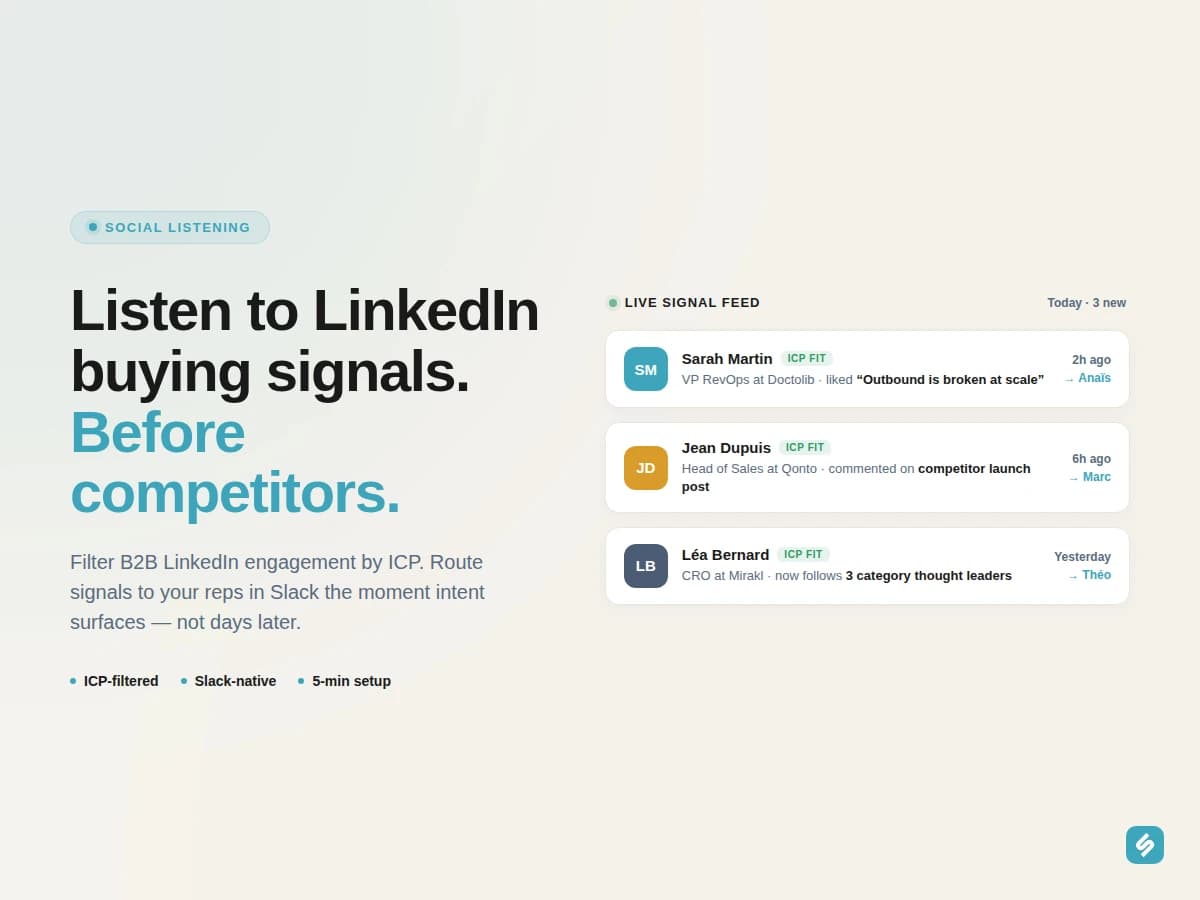
A B2B LinkedIn social listening tool is no longer a marketing toy, it is a buying-signal engine for enterprise sales. Every minute on LinkedIn, your future buyers like, comment, share, and engage with content that maps directly to their next purchase. The problem is that 99 % of social listening tools were built for consumer brand monitoring, not for AEs and SDRs working real pipeline. This page is the playbook for turning LinkedIn engagement into qualified meetings, without drowning your reps in noise. This page sits inside our broader playbook on how signal intelligence is changing prospecting.
What a B2B LinkedIn social listening tool actually does
Generic social listening platforms count mentions of a brand. A B2B LinkedIn social listening tool does something different: it watches the engagement layer, likes, comments, shares, follows, post views, across the conversations that signal buying intent for a specific category. Not "who mentioned us", but "who engaged with the topic we sell into, and do they match our ICP".
Three things separate a tool built for B2B sales from a marketing-grade listener:
- ICP filtering at the source. A signal that doesn't match your Ideal Customer Profile is noise. Filtering must happen before alerts hit your reps.
- CRM and Slack-native distribution. Sales teams live inside their CRM and Slack channels. A standalone dashboard nobody opens is dead intelligence.
- Cross-signal context. A single like means nothing. Three likes from the same prospect on three pieces of competitor content in two weeks is a deal in motion.
"We used to ship LinkedIn URLs to our SDRs in Notion. Half got ignored. Inside Slack with the persona match and the deal context, conversion went up immediately.", Kevin Gengembre, RevOps at Yoobic

Category engagement detected
Léa Bernard from Mirakl engaged with your competitor on LinkedIn
Why generic social listening tools fail for B2B sales
Most "social listening" software was built around press monitoring and consumer brand sentiment. When you point it at B2B LinkedIn conversations, three things break:
- Volume without filter. You get every mention of "CRM" in any language, on any platform. Your SDRs cannot read 4 000 alerts a week.
- No persona-aware enrichment. The tool surfaces a plumber commenting on a SaaS post. Not your buyer.
- No CRM round-trip. Signals sit in a dashboard. Nobody copies them into Salesforce. The intent rots.
The result is predictable: a one-year contract, a "social listening" budget line, zero pipeline attribution. RevOps quietly turns the tool off at renewal.
A B2B-native tool inverts the stack. It starts from your CRM and your defined personas, then listens outward, only surfacing engagement that matches a real account or contact you care about.
| Capability | Generic social listening | B2B LinkedIn social listening (Sillage) |
|---|---|---|
| Primary input | Keywords and brand mentions | ICP + target accounts + content topics |
| Filtering | Post-hoc, manual | Persona-matched at detection |
| Distribution | Dashboard, weekly digest | Slack + Salesforce / HubSpot, real time |
| Cross-signal correlation | None | Job changes, competitor activity, keywords, hiring |
| Setup | Configuration weeks | 5 minutes |
The four engagement signals that actually move pipeline
Not every like is a buying signal. After thousands of routed alerts, four patterns reliably convert into meetings.
1. Sustained engagement on category content
A VP RevOps liking three posts about "outbound at scale" from three different authors in two weeks is researching a category. Not a one-off scroll, a deliberate evaluation. This is the cleanest top-of-funnel intent signal on LinkedIn, and it is invisible without continuous monitoring.
2. Comments on competitor announcements
Comments are higher-effort than likes. A prospect commenting on a competitor's product launch is publicly raising a hand: "I'm evaluating this space". Combined with our competitor activity tracking, you can intercept the deal before the formal RFP.
3. Follows of category thought leaders
A new follower spike on the top three influencers in your category is a leading indicator of category awareness, and often, budget allocation. We treat this as a mid-funnel signal that earns a soft outreach play, not a hard sales pitch.
4. Engagement after a job change
The strongest combination on LinkedIn is job change + engagement. Sarah Martin joined Doctolib as Head of Sales last week. Yesterday she liked a post about "moving from cold to warm outbound". That is a triple-qualified prospect: new role, fresh budget, expressed category interest. See job change alerts software for the full play.
| Signal pattern | Effort to detect | Conviction | Time to outreach |
|---|---|---|---|
| Sustained category engagement | Continuous monitoring | Mid | 2–7 days |
| Comment on competitor announcement | Continuous monitoring | High | Same day |
| Follow of category KOL | Continuous monitoring | Mid (leading indicator) | Within the week |
| Engagement + job change | Cross-agent stack | Top-tier | Same day |
How to listen at scale without drowning in noise
The whole problem of B2B LinkedIn social listening is volume. Your category produces thousands of engagement events per day. A working setup uses three filters in series.
Filter 1, ICP gate. The signal must originate from someone matching your defined Personas: role, seniority, company size, industry, geography. Everything else is dropped at detection. This single filter usually removes 95 % of raw volume.
Filter 2, Account list. For Account-Based Sales teams, only signals tied to a named target account proceed. The other 5 % gets cut to the 50–500 accounts you actually work.
Filter 3, Cross-signal threshold. A single isolated engagement is parked. The moment two or more signals stack on the same prospect (engagement + job change, engagement + competitor activity, engagement + keyword post), the alert fires into Slack with full context.
The result is what AEs call a "boring inbox", five to fifteen high-conviction alerts per day per rep, each with a clear next action. Not a dashboard. A queue.
The "boring inbox", high signal, zero scroll fatigue.
From signal to qualified meeting: the workflow
A real social-listening-to-meeting motion has five steps. None of them require the rep to leave Slack or the CRM.
- Detection. The Content Engagement agent monitors target accounts and category conversations continuously.
- Qualification. Each engagement event is checked against the ICP and the account list.
- Enrichment. The alert is composed with: prospect name, role, account, last touchpoint from the CRM, the engaged content, the suggested angle.
- Routing. The alert lands in the dedicated Slack channel, plus a task is created on the right CRM owner.
- Action. The rep crafts a relevant message in under three minutes, not "congrats on the new role" but "saw you engaged with [X]'s piece on outbound, curious how you're thinking about it at [Company]".
That cycle, from public engagement to outbound, runs in well under two hours when the system is configured properly. Compare this with the legacy reality, manually scrolling LinkedIn, copy-pasting into Notion, debating ownership in Slack, and you have a 10x compression of cycle time.
Combining social listening with other Sillage agents
The real leverage of a B2B LinkedIn social listening tool is not the social signal alone, it is the moment two or more signals stack on the same prospect. Sillage cross-references the Content Engagement agent with seven other agents to surface the highest-conviction opportunities.
| Agent | What it adds to a social listening alert |
|---|---|
| Job Updates Detection | New decision-maker recently arrived = fresh budget window |
| Competitor's Activity | A rival rep is also engaging the same account = active buying cycle |
| Keyword Detection | Prospect publicly posted about the pain you solve |
| Champion Tracking | A former customer just joined the engaging account |
| Influencer Engagement | Prospect engages with the top voices in your category |
| Hiring Signals | The account is recruiting roles tied to your product |
For a deeper dive on the social-lead-scoring side of this stack, see advanced lead scoring beyond demographics.
For a wider view of the 2026 B2B sales AI landscape and how Sillage sits next to other platforms, see our comparison of the best AI tools for B2B prospecting.
Sillage versus traditional social listening tools
Generic platforms (Mention, Brandwatch, Talkwalker, Sprinklr) were built for marketing and PR teams tracking brand sentiment. They are powerful in their domain, and entirely the wrong shape for B2B enterprise sales. Three concrete differences matter for a sales operator:
- No new tool, no new tab. Sillage lives inside Slack and your CRM. There is no separate dashboard for AEs to remember to open.
- Native subsidiary mapping. When the engaging contact is at a regional subsidiary of a global account, the alert routes to the global account owner, not a duplicate rep.
- API for AI agents. The same signal feed that powers your Slack alerts also exposes a structured API for autonomous AI agents in your stack. Single source of truth, human and machine.
Frequently asked questions
What is a B2B LinkedIn social listening tool?
A B2B LinkedIn social listening tool monitors engagement events, likes, comments, shares, follows, on conversations relevant to a defined category, then qualifies each signal against an Ideal Customer Profile and routes the matched signals to sales reps in real time. It is distinct from generic social listening, which tracks brand mentions for marketing purposes.
How is it different from a competitor monitoring tool?
A competitor monitoring tool specifically tracks what your competitors and their employees do on LinkedIn. Social listening is broader, it covers engagement on category topics, influencer content, and industry conversations, regardless of source. The two work best together inside the same platform.
Can it integrate with Salesforce and HubSpot?
Yes. Sillage syncs natively with Salesforce and HubSpot, so every social listening alert is enriched with CRM context (deal stage, last touchpoint, account owner) and routed as a task to the right rep. No Zapier or custom API plumbing required.
How quickly do signals reach the sales team?
Alerts are pushed to Slack and the CRM in real time, typically within minutes of the engagement event being detected on LinkedIn. This speed is the difference between intercepting a deal in the consideration phase and arriving after the RFP.
How does ICP filtering work?
Personas are defined inside Sillage using criteria such as role, seniority, company size, industry, and geography. Every detected engagement is automatically checked against these criteria, and only matching signals trigger an alert. Non-matching events are dropped silently, your reps never see them.
How long does setup take?
Configuring the first Content Engagement agent takes about five minutes: connect the CRM, define the Personas, select the topics or accounts to monitor, choose the Slack channel for alerts. No engineering or RevOps lift required beyond that.
Can the social signals feed an AI agent or a custom workflow?
Yes. Beyond Slack and CRM distribution, Sillage exposes a Signal API. Custom AI agents, internal scoring models, or downstream orchestration tools can consume the structured signal feed directly. This lets you build a single source of truth for both human reps and automated workflows.
Ready to put your LinkedIn category conversations to work? Book a demo and see Sillage turn engagement into pipeline inside Slack and your CRM.
Book a demo
Related plays
Social listening is one of eight signal agents in the Sillage stack. Cross-reference it with:
- B2B KOL tracking & influencer marketing tool, narrower listening, on the audiences of specific creators.
- LinkedIn intent data tool, catch prospects publicly posting about a pain you solve.
- B2B champion tracking software, re-engage former customers the moment they land in ICP accounts.
- B2B hiring signals software, turn public job postings into the leading indicator of category spend.
- Account-based signals tool, consolidation layer over all signal categories, per account.
- B2B signal-based selling platform, the full eight-agent platform context.
- the shift to signal-based prospecting, the broader framework.