Key accounts
Your prospects and customers, gathered from your lists, and the ones Sillage watches for you.
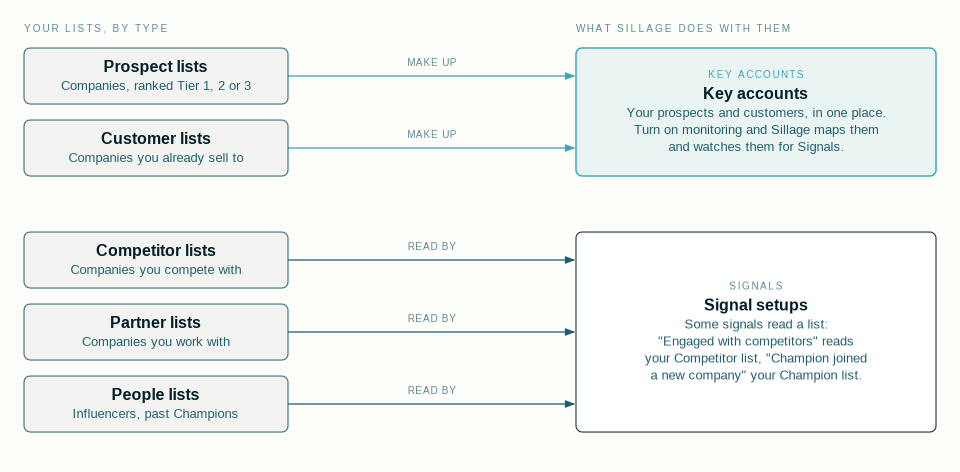
Your key accounts are your prospects and customers: every company in your Prospect and Customer lists, gathered in one place.
Why it matters
Key accounts are where Sillage does its deepest work. Turn on monitoring for an account and Sillage follows the company and its decision makers, so you hear about a job change or a competitor conversation the week it happens.
How it works
- They come from your lists. Add a company to a Prospect or Customer list and it shows up in your key accounts.
- You choose which ones Sillage watches. Monitoring is a switch per account. You can also monitor a whole list, and new companies added to it later are included.
- A monitored account gets mapped. Sillage finds the company and the people in it who match your persona: see Account mapping.
- Monitoring costs credits per account, per month. It renews by itself. When you stop it, the account stays watched until the end of the month already paid. If you run out of credits, monitoring pauses and resumes on its own when you add credits.
- With several business units, monitoring is paid per business unit. An account watched for one team is not watched for another until you turn it on there too.
Where you find it
- In the app: Key Accounts in the sidebar. The Accounts tab lists every account with its Decision makers and Activity. Add account adds companies to a list. The Lists tab shows how many accounts each list monitors and what it costs per month.
- With your assistant: ask "Which of my key accounts are not monitored yet?"
- With the API: Account monitoring and Lists.