Lists
The groups of companies and people you follow, from prospects to competitors.
A list is a group of companies or people you follow, imported or added by hand.
Why it matters
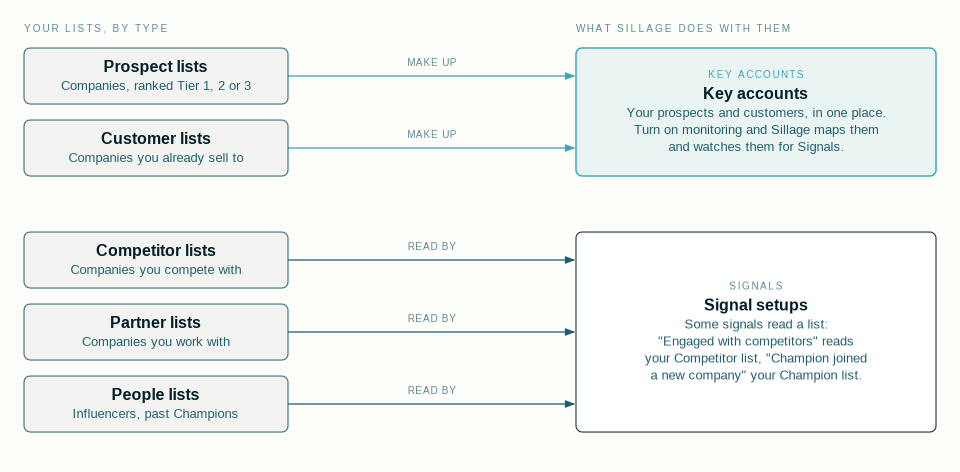
Lists tell Sillage what to watch. Your prospect and customer lists become your key accounts. Your other lists give your signals something to look for, like "anyone at my accounts who engaged with a competitor".
How it works
- Every list has a type, chosen when you create it:
| Type | Holds | Used for |
|---|---|---|
| Prospect | Companies | Accounts you want to win. They become key accounts. |
| Customer | Companies | Accounts you already sell to. They become key accounts. |
| Competitor | Companies | Signals about people engaging with your competitors. |
| Partner | Companies | Signals about people engaging with your partners. |
| Influencer | People | Signals about people engaging with influencers in your space. |
| Champion | People | Signals when a past champion changes job or gets promoted. |
| Employee | People | Your "All my employees" list, created for you. |
- Prospect lists have a tier (Tier 1, 2 or 3), set when you create the list. Use tiers to rank how hard you want to go after an account.
- Smart lists fill themselves from rules on your CRM fields. You can read them, but not add or remove companies by hand.
- A list can be shared or tied to a business unit. A list tied to no business unit is visible from all of them.
- A list in use can't be deleted. Remove it from the signal setups that read it first. Archiving a list keeps its companies and people.
Where you find it
- In the app: Key Accounts → Lists, then Manage lists. Workspace admins also find every list in Settings → Lists.
- With your assistant: ask "Create a Tier 1 prospect list with acme.com, globex.com and initech.com."
- With the API: Lists.