


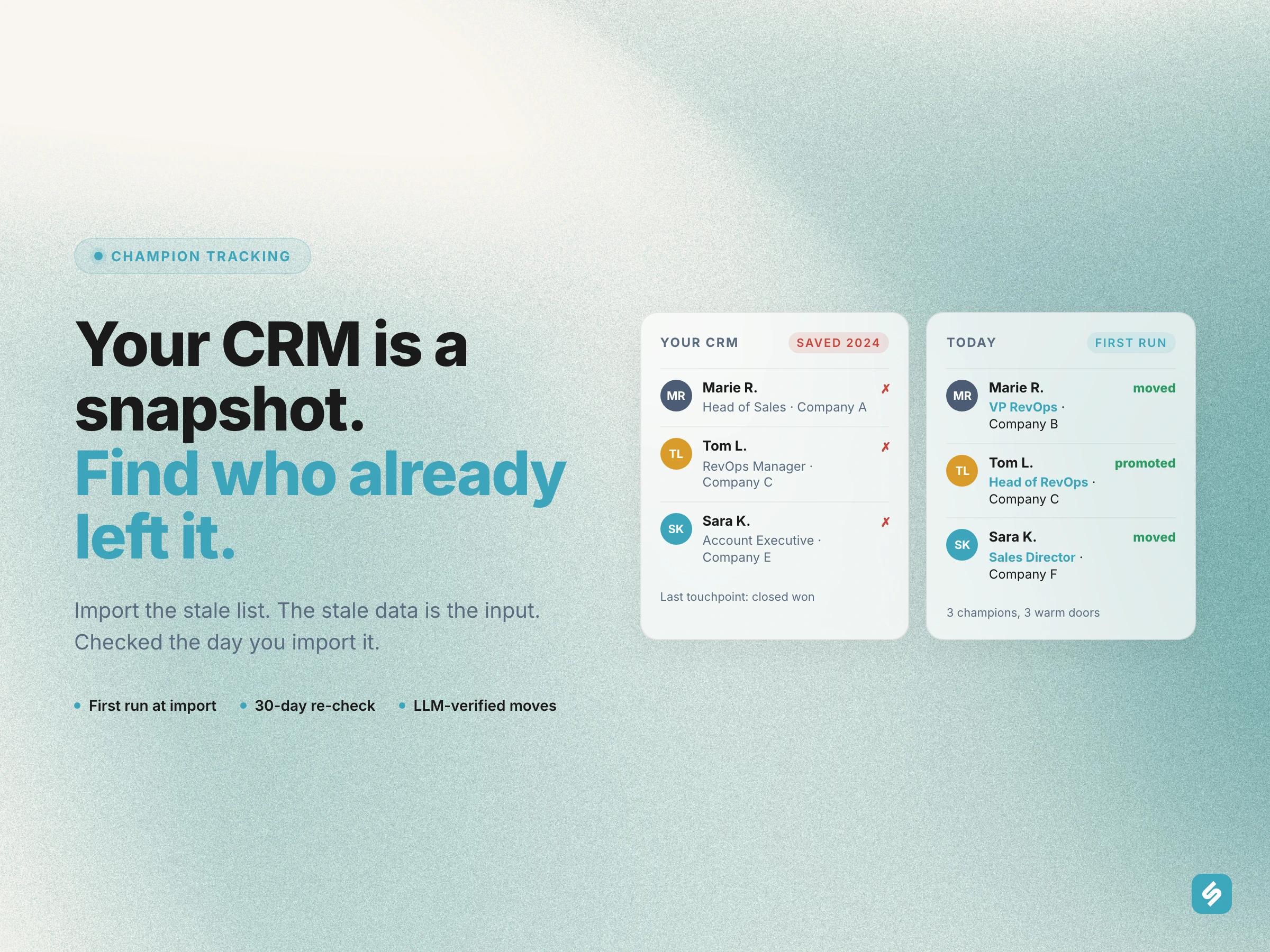
Your past customers change jobs, and your CRM does not notice. You can find them again from the list you already have, on the first run, the day you import it. Every contact in that list was right the day someone saved it. Then people moved, got promoted, left. The record stayed (it is very loyal that way).
The champions are the ones that hurt. A champion is someone who already bought from you, or pushed for you inside their company. When they land somewhere new, you have a warm door into an account you never worked. Your CRM has no idea. It still shows the old company, the old title, and, say, a last touchpoint from 2024.
This article shows how to track those job changes from your CRM list, and why the first run starts the day you import the list. If you prefer the one-line version: import the stale list, the stale data is the input.
Why do CRM contacts go stale?
CRM contacts go stale because nobody updates a contact after the deal. The record gets created during the sales cycle, enriched once, and then it ages quietly. There is no reason for a rep to open a closed-won contact two years later (the quota is elsewhere).
LinkedIn, on the other hand, gets updated by the person themselves, usually soon after the move. So you have two sources that disagree, and the one you pay for is the wrong one.
Let's be fair to the CRM. It is a system of record, not a system of change. The job of catching the change belongs to something else.
Who counts as a past champion?
Not every contact. A champion is someone with proof: a past buyer, a power user, an executive sponsor, the person who forwarded your deck internally. You know them by name, and they know your product by heart.
That list is smaller than your CRM, and that is the point. A champion list of, say, 150 people is a working asset. A 40 000-contact CRM export, to take an example, is a spreadsheet (a large one).
How do teams track past customers' job changes today?
Three ways teams track past customers' job changes. Which one is yours?
- The quarterly audit. Picture it: someone opens LinkedIn, checks the top 30 names by hand, finds two moves, and posts them in Slack. Then the quarter ends.
- Job-change alerts on new contacts. A tool watches your persona for people starting a new role (we wrote about job change alerts software separately). Useful, but it watches strangers. Your past buyers are not in that net.
- A champion list re-checked on a schedule. The list is explicit, the check is automatic, and a move becomes a signal with the person, the old company, the new company and the date.
Most teams we talk to are between 1 and 2. The step to 3 is not a tool problem, it is a list problem. Once the list exists, the rest is a cron.
How to find job changes from your CRM list on the first run
This is the part people do not expect. When you import a champion list, a run starts right away. It compares what you knew with where each person is today.
- Your CRM says Marie was Head of Sales at Company A. That is the snapshot.
- Sillage pulls Marie's current LinkedIn profile: reused when it already holds a fresh one, refreshed when it does not.
- The first run puts the two side by side. Different company, different title, or both? That is a candidate move.
- An LLM reads the candidate and confirms it is a real move, not a title rewording or a second affiliation (people collect those).
So the outdated data is the input. The staler your CRM, the more the first run finds. This is why the import is the first run, not a setup step: the signal was already sitting in the gap between your CRM and LinkedIn.
One honest limit: a contact with no LinkedIn URL is left out, there is nothing to compare against. And if the first run cannot start (one is already going, or the balance is too low), the Sunday run picks the list up.
How often should you re-check a champion list?
Every 30 days, not every minute. People do not change jobs every minute. A move is a monthly event at best, and the announcement on LinkedIn usually lags the real start date anyway.
So the re-check runs every 30 days against a fresh profile, and signals come out of a run (Sunday, or whenever you launch one). Nothing happens the second you edit the list. We say this plainly because "real time" sounds great on a landing page and means nothing for this signal (nobody has ever needed to know about a job change within the hour).
Four change types come out of a run: left the company, changed company, changed title, or both. Each one lands as a signal with the proof attached, so the rep does not have to reopen LinkedIn to believe it.
On cost: there is no per-profile charge. A run is refused only when the balance is under one Discovery move, so a scraped champion is never lost for a month over a few credits.
How to re-engage a past customer after a job change
Write the message the same week. Not "congrats on the new role" (they have, what, 60 of those). Something like: "Saw you joined Company B as VP RevOps. Last time we worked together you were the one who pushed the Slack routing. Want me to show you what changed since?"
Route it where the rep already works. The signal goes to Slack and to the CRM record, with the old context attached. Nobody has to open a dashboard (dashboards are where signals go to retire).
Then do the boring thing: add the new company to the accounts you watch. A champion who moved is also a company that just hired someone who likes you.
How to build a champion list that works
- Start with the list you are ashamed of. The older the export, the better the first run.
- Keep it to real champions. Past buyers, power users, sponsors. Not every contact with a title (the champion tracking software guide goes through who belongs on it).
- Add every churned champion the day the account churns. That is the cheapest future pipeline you will ever own.
- Decide who owns the move before it happens. The rep on the old account, or the rep on the new territory? Pick one, write it down.
- Read the first run with the team. It is the fun part, and it usually settles the "do we need this" debate in one meeting.
Want to see what your champion list says on the first run?
Frequently asked questions
How do you find out if a past customer changed jobs?
Compare the company and title in your CRM with the person's current LinkedIn profile. Sillage does this on the first run, right after the import; the re-check then runs every 30 days against a fresh profile.
How often should you check your CRM contacts for job changes?
Every 30 days, during a run. Signals never appear just because the list was edited; they come out of a run.
What counts as a job change signal?
Four types: left the company, changed company, changed title, or both. Each is verified by an LLM before it becomes a signal.
Does champion tracking cost credits per profile?
No. A run is refused only when the balance is under one Discovery move. There is no per-profile charge.
Where do job change signals show up?
In the Sillage signal feed, in Slack, and on the CRM record, with the old company and the new one side by side.
I hope this helps you find a few people who still like you and forgot to tell your CRM!